
A secure tunnel implemented in Go
- Multi-port listening, proxy forwarding, multi-level forwarding,
- Supports HTTP HTTPS HTTP2 SOCK4 SOCKS5 TLS WEBSCOSK and more
What are the benefits of a tunnel:
For example, when setting up shadowsocks,
this encryption method is no longer secure, and shadowsocks encryption is easily blocked by firewalls. Creating a tunnel can change the encryption method between the server and the client, making encryption more flexible
gost github project address
https://github.com/ginuerzh/gost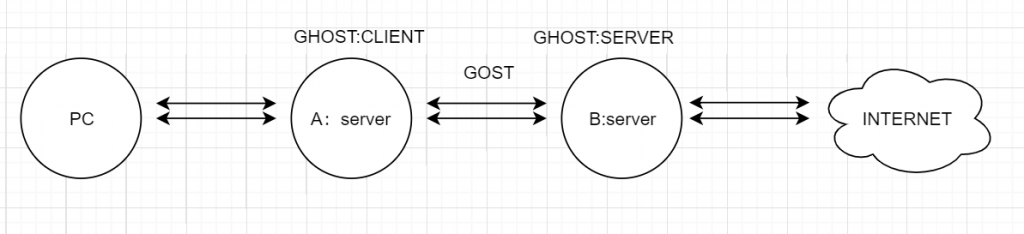
PC–>Local computer—>Service A inside the firewall<—-via gost—>Server B outside the firewall (shadowsocks)—->Overseas Internet
gost one-click script
wget --no-check-certificate https://raw.githubusercontent.com/xiaohouzivpn/script/master/ghost.sh chmod +x ghost.sh &&./ghost.sh
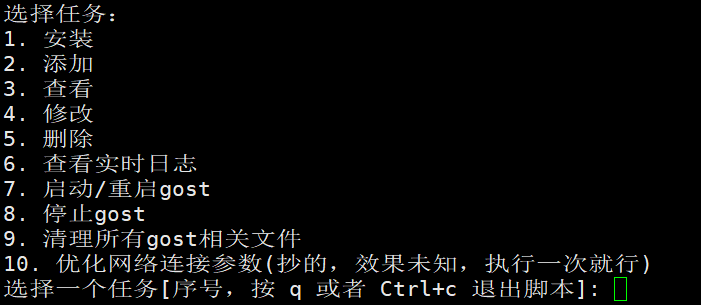
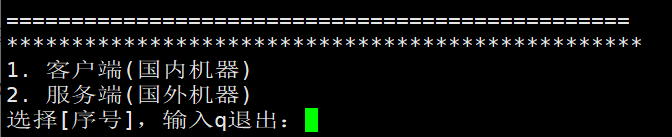
For example, if you want to tunnel through to outside the firewall, the domestic server acts as the client, and the overseas server acts as the server and sets up shadowsocks
Question 1: If you use a domestic server and cannot automatically download gost from github
please manually download the Linux file from github to the same directory as the script
Question 2: Does it support openvpn
and other proxy software tunnel setups? In principle, they are all feasible
Question 3: What tunnel is recommended? Currently, a websocks tunnel is recommended because it is relatively fast and the connection is also more stable