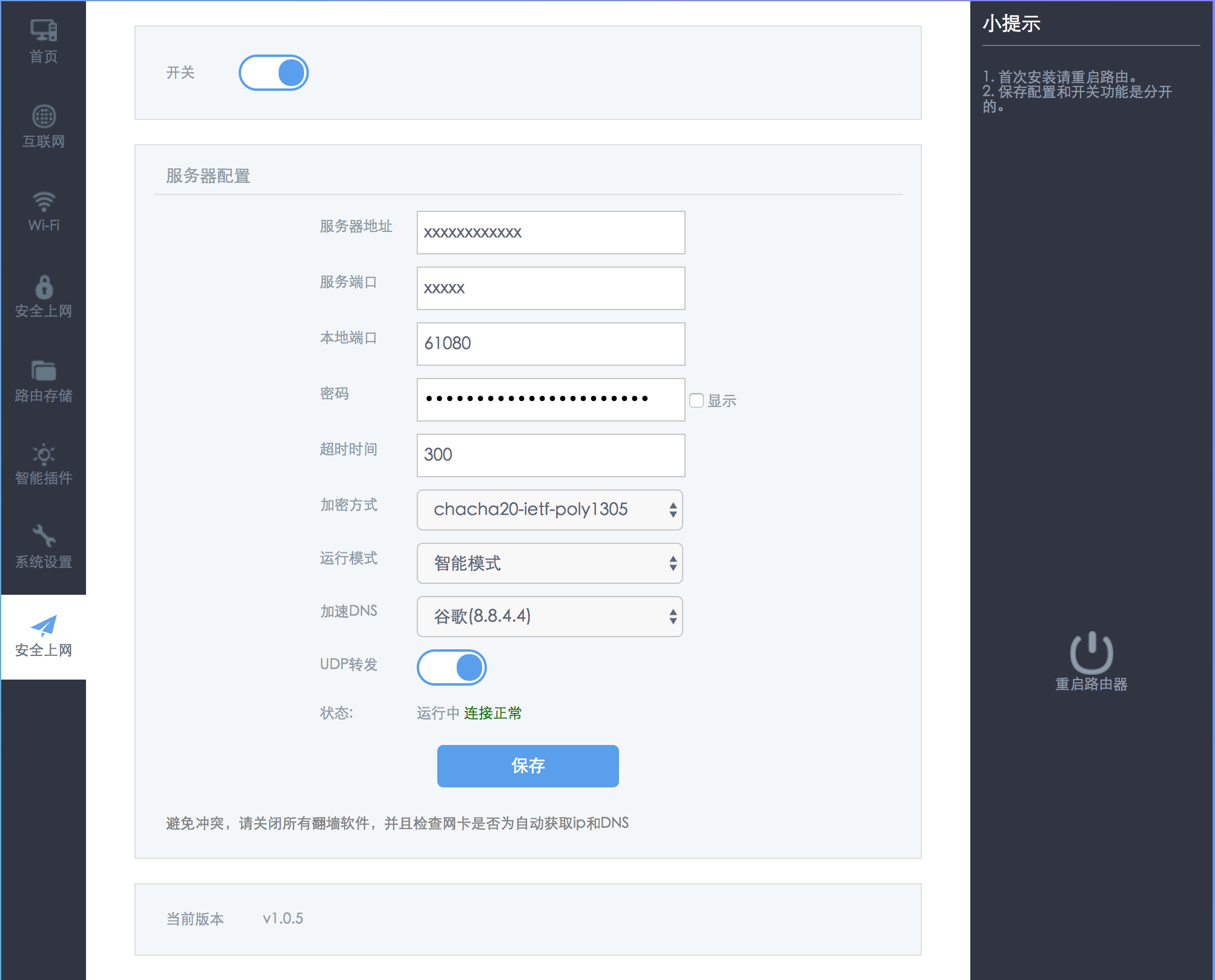
hiwifi-ss
We shall fight on the beaches.
HiWiFi + ss configuration, adapted for newer HiWiFi versions. The supported HiWiFi versions are (Since there’s no way to test every HiWiFi model, if your working HiWiFi is not on this list, please reply in issue#38. Thank you!):
The project is currently using Mainland China whitelist mode. For how Mainland China whitelist and gfwlsit are handled, see issue#37. The gfw rules in this project are modified from the rules generated by the project cokebar/gfwlist2dnsmasq, with the last update on 2017.08.08.
Installation Method
-
Newer HiWiFi =>
Use theshadow.shscript in the project root directory for installation,
it is recommended to use the following one-click command:cd /tmp && curl -k -o shadow.sh https://raw.githubusercontent.com/qiwihui/hiwifi-ss/master/shadow.sh && sh shadow.sh && rm shadow.sh
-
hiwifi 1.2.5.15805s
cd /tmp && curl -k -o shadow.sh https://raw.githubusercontent.com/qiwihui/hiwifi-ss/master/shadow.sh && sh shadow.sh 12515805s && rm shadow.sh
Update dnsmasq.conf Locally
Just use the script in the project gfwlist2dnsmasq
git clone https://github.com/cokebar/gfwlist2dnsmasq.git
cd gfwlist2dnsmasq
./gfwlist2dnsmasq.sh --port 53535 -o gw-shadowsocks.dnslist

# Copy gw-shadowsocks.dnslist to hiwifi-ss/etc/gw-shadowsocks/gw-shadowsocks.dnslist for packaging
# Or, copy it directly to HiWiFi at etc/gw-shadowsocks/gw-shadowsocks.dnslist
Local Installation/Development
Using tag v1.0.5 as an example
# Generate the tar package locally
git clone [email protected]:qiwihui/hiwifi-ss.git
cd hiwifi-ss
git checkout v1.0.5
tar -C ./ -czvf hiwifi-ss.tar.gz etc lib usr
scp -P 1022 hiwifi-ss.tar.gz [email protected]:/tmp

# Log in to HiWiFi via SSH
tar xzvf /tmp/hiwifi-ss.tar.gz -C /
How to enable chacha20 support on the server side:
-
Compile and install libsodium:
apt-get update apt-get install build-essential wget https://github.com/jedisct1/libsodium/releases/download/1.0.3/libsodium-1.0.3.tar.gz tar xf libsodium-1.0.3.tar.gz && cd libsodium-1.0.3 ./configure && make && make install - Fix the dynamic link library:
Edit the /etc/ld.so.conf file,
add a line /usr/local/lib and save it. Run the command ldconfig
- Then just change it to
chacha20in the ss configuration
Note: Compiled based on a reference from xqd’s little site, Thank you!
Frequently Asked Questions
- Which encryption methods are supported?
Theoretically, all algorithms supported by ss-local 2.4.7 are supported.
- After installation, it shows
The requested interface does not exist?
Please restart the router. issue#28
- Which HiWiFi versions are supported?
see issue#38
- How do I uninstall the script?(issue#12)
Rename /usr/lib/lua/luci/view/admin_web/network/index.htm.ssbak to /usr/lib/lua/luci/view/admin_web/network/index.htm,
and remove ss: opkg remove geewan-ss
-
If you see an error like the one below, please make sure you are logged into the HiWiFi backend before running the script:
ssh. Do not run it on your own computer 🙁
[email protected]
-p 1022x etc/: Could not remove symlink etc x etc/config/: Cannot extract through symlink etc x etc/firewall.d/: Cannot extract through symlink etc x etc/gw-redsocks/: Cannot extract through symlink etc x etc/gw-redsocks.conf: Cannot extract through symlink etc x etc/gw-shadowsocks/: Cannot extract through symlink etc x etc/init.d/: Cannot extract through symlink etc x etc/rc.d/: Cannot extract through symlink etc x etc/ss/: Cannot extract through symlink etc ......
- How does the project run automatically at startup?
The project adds S99gw-shadowsocks under /etc/rc.d/, pointing to /etc/init.d/gw-shadowsocks, so it will run automatically at startup.
Some questions about open-sourcing the underlying source code
This project is based on geewan’s hiwifi configuration program. At the underlying level, there is only compiled lua
code. Aside from the shadowsocks used, which is licensed under the GPL,
there is no issue with the other parts not being open source.
In the spirit of making progress together, the author has tried to implement and open-source some features; any feedback on shortcomings is welcome.
This project will continue to add and improve features. It’s just that the author hasn’t been developing for very long, so progress will be relatively slow. Please don’t rush~
TODO
- Phase One
-
Adapt to the new version of the interface
- Switch style
- Added a “shadowsocks settings” button
- Fixed the functionality of the “shadowsocks settings” button
- Fixed the password display function
- Fixed the popup prompt box
- Fixed the dropdown style
-
Fixed the “Import configuration file (JSON format)” interface;
The interface has been fixed, but there are issues with the underlying functionality; - Fixed the “Advanced Settings” interface
- release/v1.1.0 => Completed UI adaptation of all previous features for the new version
-
Use GitHub as file storage.
Since scripts can be used fromraw.githubusercontent.com, downloadingss.tar.gzshould not be a problem either, just slower; - Add more routing rules to the underlying layer
- Some issues regarding open-sourcing the underlying source code
- Next stage
- Upgrade the ss-libev version
-
Support ss-libev obfuscation
(simple-obfs) - Support SSR
Contributions
- If you encounter any problems or have suggestions while using it, please don’t hesitate to open an issue for me;
- If you have your own ideas about the code and have implemented them, please send me a Pull Request;
- I am no longer accepting emails. Everyone should be able to see the issues, which reduces duplicate answers. Please open an issue, thank you~
Current status
- New Interface
(1). SS Account Settings