Cracked Ruisu for Linux
The one-click automatic installation package in this post will be continuously updated. Feel free to bookmark it, and any future updates will be synced to this article.
This cracked version of Ruisu is the unlimited bandwidth edition, and some of the code from the cracked Ruisu will be gradually open-sourced.
Latest updates to the cracked Ruisu
=======Updated on May 28, 2017=========== :
- The Ruisu installation files have been modified a bit; if you encounter any issues, please report them promptly.
- If you have already installed it and are not experiencing any disconnection issues, there is no need to reinstall.
Also: important things should be said three times!!!
Ruisu does not support Openvz!!! Ruisu does not support Openvz
!!! Ruisu does not support Openvz!!!
You may need:
-
openvz can now install BBR+SSR via UML.
For details, see “One-click UML+BBR package for openvz (test), runs on 64M
low memory” -
If your kernel is not the right one and you are using Centos,
please refer to “Tutorial: Replacing the kernel on CentOS,
with downloadable kernels compatible with Ruisu”. As for debian and ubuntu,
I’m not familiar with them, and there is no one-click package yet, so please search on Baidu or Google
yourself. -
If you want to know whether certain servers are suitable for you, please check out various review reports . Every day I publish some VPS
review reports from my own testing, so feel free to bookmark this site and stay tuned.
How to install the cracked version of Ruisu:
|
1
|
wget
–N —no–check–certificate https://github.com/91yun/serverspeeder/raw/master/serverspeeder.sh && bash serverspeeder.sh |
How to uninstall the cracked version of ServerSpeeder:
|
1
|
chattr
–i /serverspeeder/etc/apx* && /serverspeeder/bin/serverSpeeder.sh uninstall –f |
Features of the cracked version of ServerSpeeder:
If the kernel matches exactly, it will be downloaded and installed automatically.
If there is no exactly matching kernel, the interface will prompt you with optional kernels, and you can manually choose the closest one to try.
Automatically download the license file
Automatically modify the configuration file
chattr +i has been applied to /serverspeeder/etc/apx*
Modification of the configuration file is disabled, so there is no need to add hosts anymore.
Currently only CentOS, ubuntu, and debian are supported
. If support for other systems is available, you can go to
http://www.91yun.org/serverspeeder91yun
to manually download installation packages for other systems
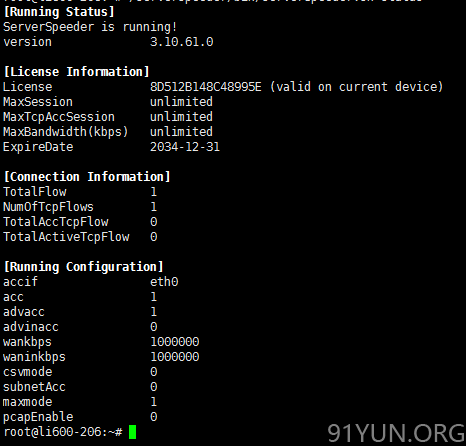
======= Update on March 17, 2017 =========== :
- Previously, many dependency libraries were installed; these have basically all been streamlined, and no dependency libraries are installed proactively anymore.
-
All prompts have been changed to English, so putty
should now display them properly as well. -
The installation packages and supported library list have all been moved to github
, and the binary files have been moved to a Los Angeles server, so downloads within China should also be relatively fast now. - Enabled inbound acceleration in the configuration file
- The configuration file now includes a default bandwidth of a G port
- Manual kernel selection installation has been restored. You can check the currently supported complete kernel list
======= Update on August 7, 2016 =========== :
-
The following supported kernels have been added. Everyone is welcome to test them, and please report any problems promptly:
- CentOS-6.8 : 2.6.32-642.el7.x86_64
- CentOS-7.2 : 3.10.0-327.el7.x86_64
- CentOS: 4.4.0-x86_64-linode63
- Ubuntu_14.04: 4.2.0-35-generic
- Debian_8: 3.16.0-4-amd64
=======Update on June 5, 2016===========:
-
Modified the installation code for release_lsb,
which had been heavily complained about.. -
Added an error prompt for network interfaces not named eth0. This crack has been confirmed to not support network interfaces whose name is not
eth0. Please modify it yourself in 《 CentOS change network interface name 》 -
Modified the ServerSpeeder installation script
-
During installation, the previous manual input for the accelerated network interface, upload/download bandwidth, etc. has been removed, and the default installation method is now used. If you need to make changes, please directly modify the ServerSpeeder configuration file after installation:
vi /serverspeeder/etc/config
-
Changed the original default value of accppp in the configuration file to 0.
This avoids errors during installation on machines without the ppp
service installed. -
Fixed the issue on centos7
where it might not start automatically at boot after installation -
Known issue: debian
cannot start automatically at random; please manually add ”
/serverspeeder/bin/serverSpeeder.sh
start ” to rc.local startup
-
During installation, the previous manual input for the accelerated network interface, upload/download bandwidth, etc. has been removed, and the default installation method is now used. If you need to make changes, please directly modify the ServerSpeeder configuration file after installation:
=======Updated on March 24, 2016 ===========:
-
Switched to a simpler way to get the MAC
address. If it worked before but does not work now, please let me know. Thanks. -
You can now enter the MAC address manually. Usage: bash
serverspeeder-all.sh MAC address
That is, add the MAC address as a parameter after the command. For example
:bash serverspeeder-all.sh
52:54:00:D3:0F:6C
Also: important things should be said three times!!!
=======Updated on March 16, 2016 ===========
-
Changed the kernel matching mechanism to match across all kernels within the same major version, improving the success rate of matching (for example, if you are using
Centos6.7, but the kernel is the same as that of Centos6.4,
then the 6.4
kernel will be installed). When the kernel is the same, in most cases they are interchangeable. (If there are any issues, you can contact me for further verification.) -
Regarding kernel mismatch issues, you can refer to “Tutorial: Replacing the CentOS
kernel, with downloadable kernels available for ServerSpeeder ” - Added automatic startup entries. (Because I found that some systems do not start automatically after reboot.)
-
PS: I found that some users cannot install it if their network interface name is not eth0.
If this happens, please contact me. I need similar cases for some testing. Thanks.